Karaoke for cafés and homestays: host a guest sing-along
Thinking of a karaoke night for guests at a small café, homestay or guesthouse? How to set up the screen, let guests in with a QR code, keep the queue in order, and what to check about music licensing.
More and more small cafés, homestays and guesthouses run a casual "karaoke night": not a professional karaoke room, just a TV or projector in the corner, a couple of speakers, and anyone who feels like it gets up for a song. Groups of travelers love it, and for the owner it's one more reason guests stay longer and come back.
The tricky part is choosing songs. A paper song book or a shared remote always means someone waiting, someone jumping the line and someone skipping another table's song by accident. This post describes a different approach: the player screen runs on the web, guests scan a QR code and pick songs on their own phones, and the owner or staff keep control.
One thing up front: Hát nhau nghe is a free web karaoke tool built for friends and families. It is not a licensed commercial karaoke system. If you use it in a business, please read the licensing section near the end.
How venue karaoke differs from home karaoke
Technically it's the same: one screen, everyone's phone and an internet connection. The difference is people:
- Guests don't know each other. At home everyone knows everyone; in a café one table doesn't know the next, so the rules need to be clearer.
- The crowd keeps changing. People come and go all evening, so joining must be instant, with no app to install and no account to create.
- Someone needs to run things. Who can skip, which songs play and when it stops should be up to the venue.
- Neighbors and quiet hours. A café on a residential street is a very different place from a hillside homestay.
Most of this is covered by the room settings. Let's go through it.
Setting up the player screen
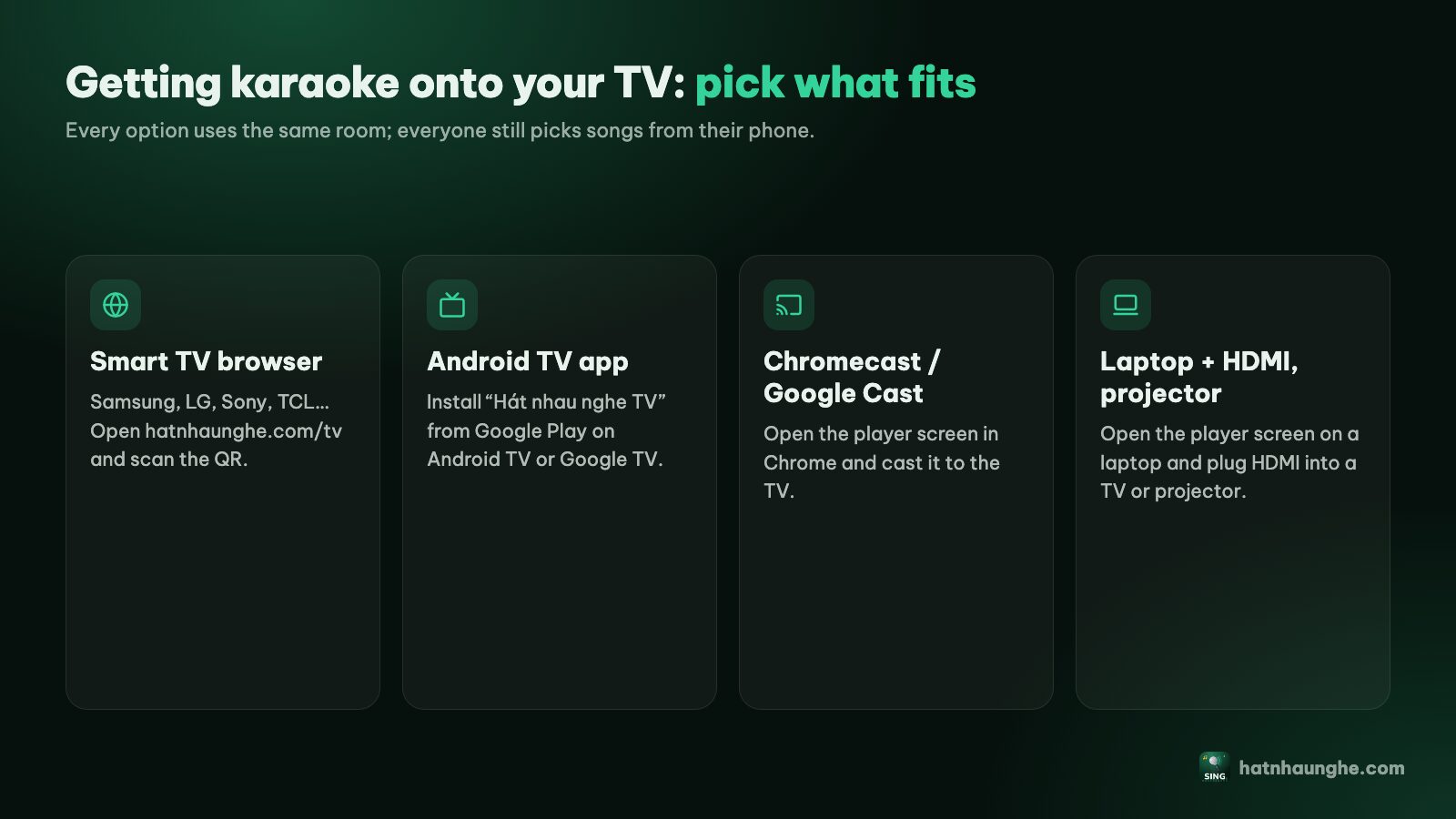
The player screen is where the karaoke video with on-screen lyrics plays. For a venue, the common options are:
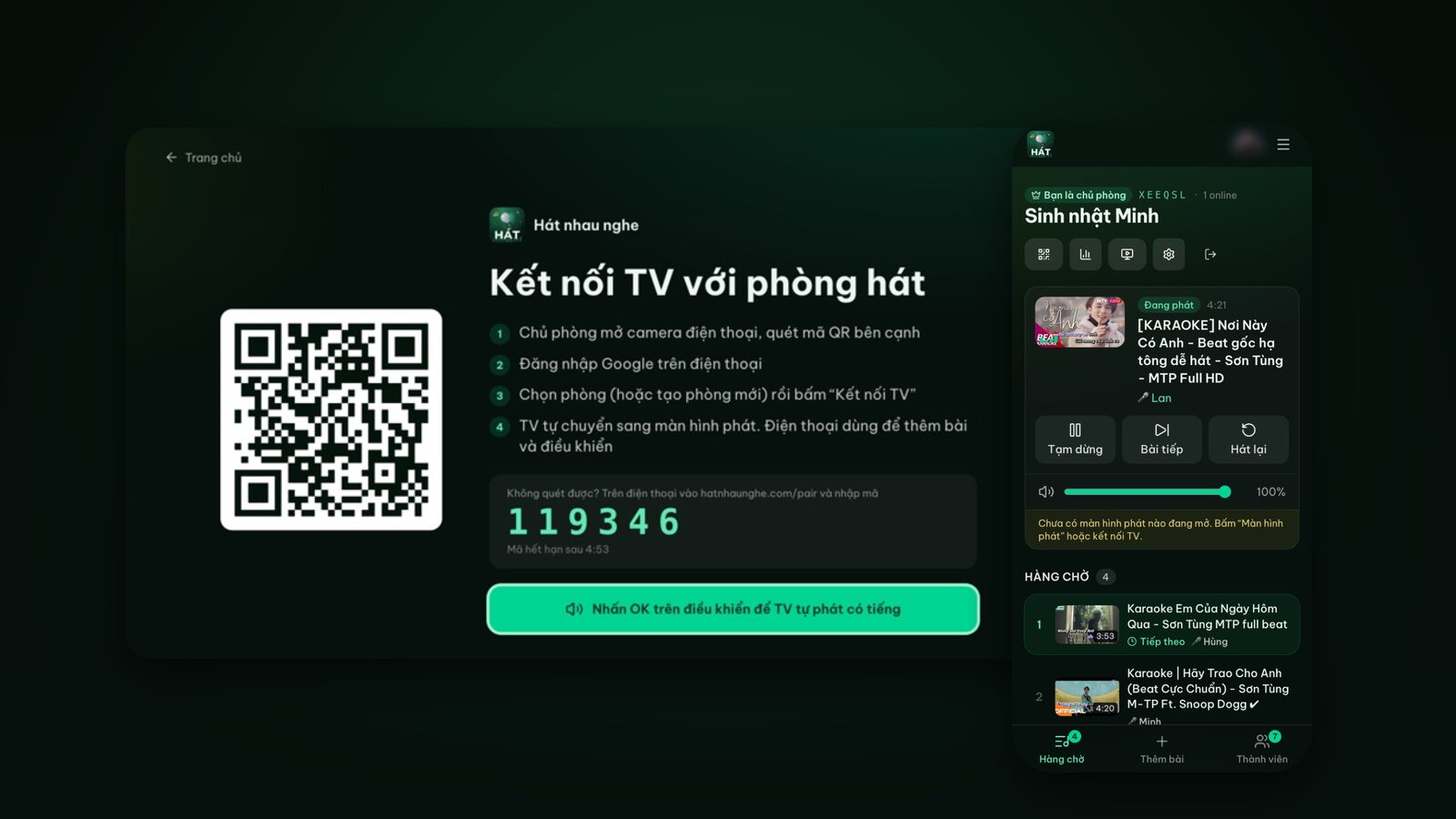
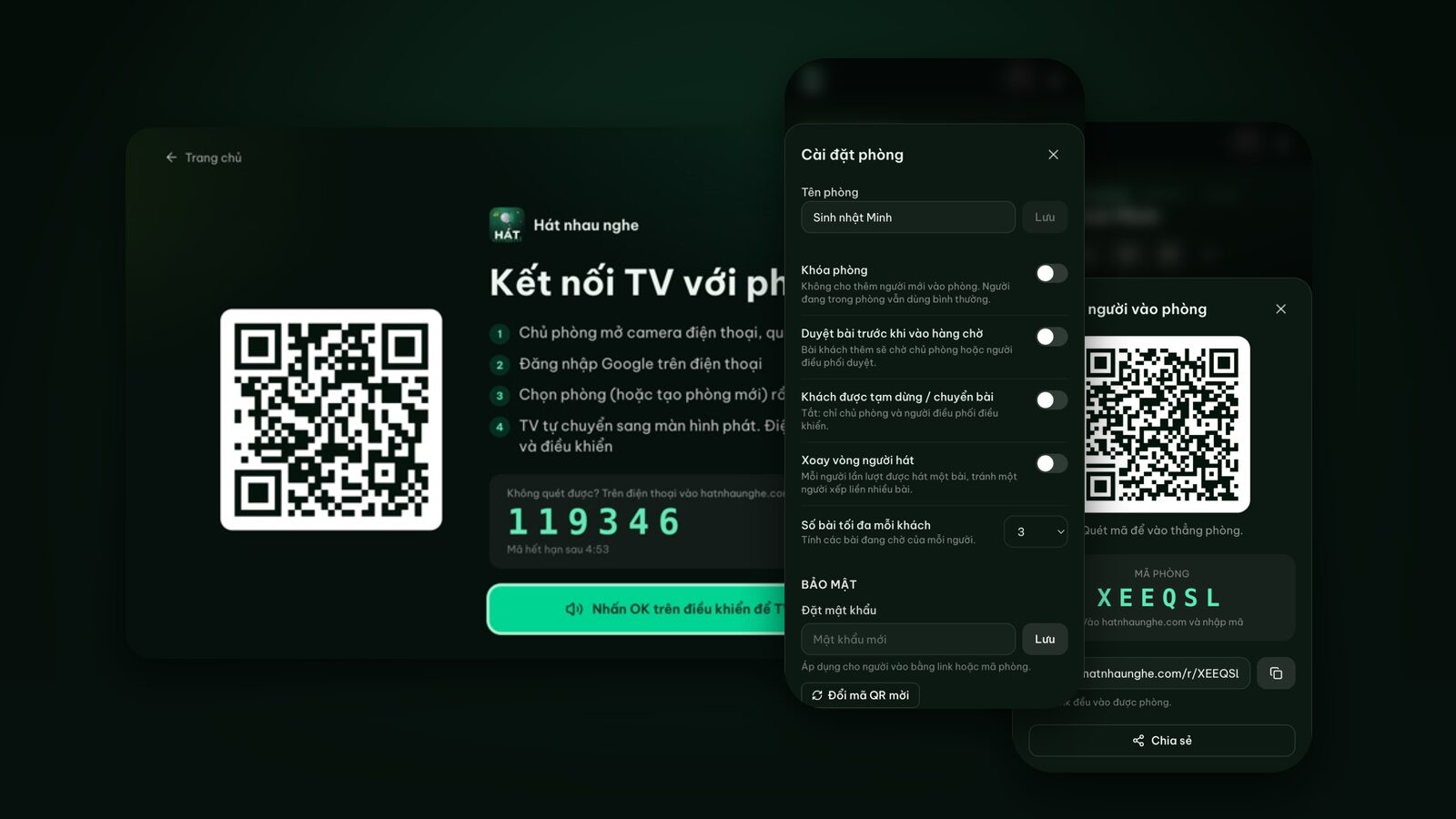
- A smart TV with a browser: open the TV's browser and go to hatnhaunghe.com/tv. The TV shows a QR code and a 6-digit code; the host scans it, picks the room and taps Connect TV.
- Android TV or Google TV: install the "Hát nhau nghe TV" app from Google Play and pair it with a QR code the same way.
- A projector or big screen on a laptop: open the room on the laptop, go to Player screen, choose This device, tap Open player screen and go full screen. Great for projecting onto a garden wall.
- Chromecast / Google Cast: cast the player screen from Chrome to a TV with Google Cast.
Each room has one player screen. Opening a player on a new device disconnects the old one, so make sure staff don't open a second one mid-evening. There's more on specific TVs in karaoke on Samsung, LG and Android TV, and on projectors in karaoke on a projector or laptop.
Guests join with a QR code
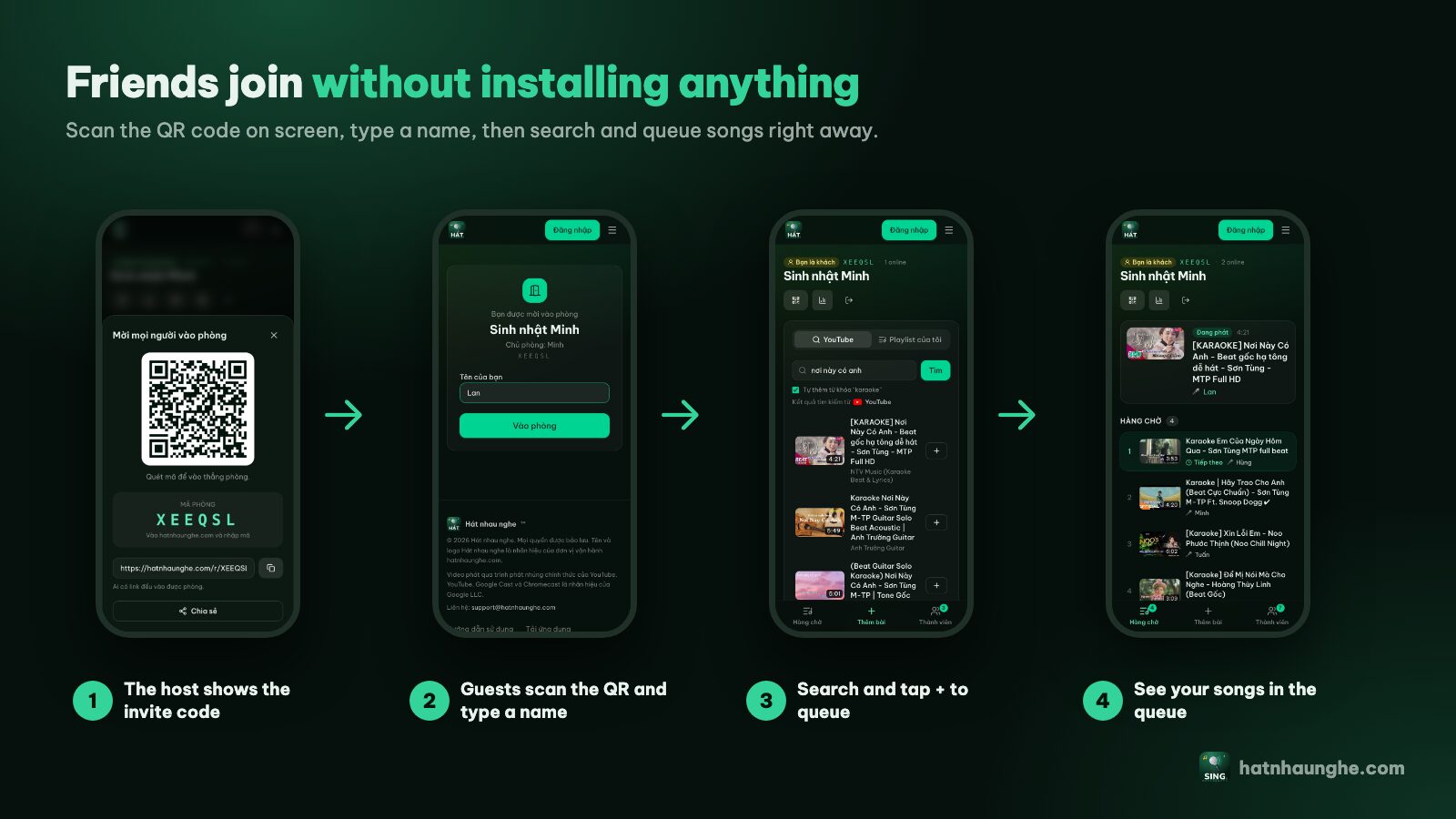
This is the part guests like best. Nothing to install, no account:
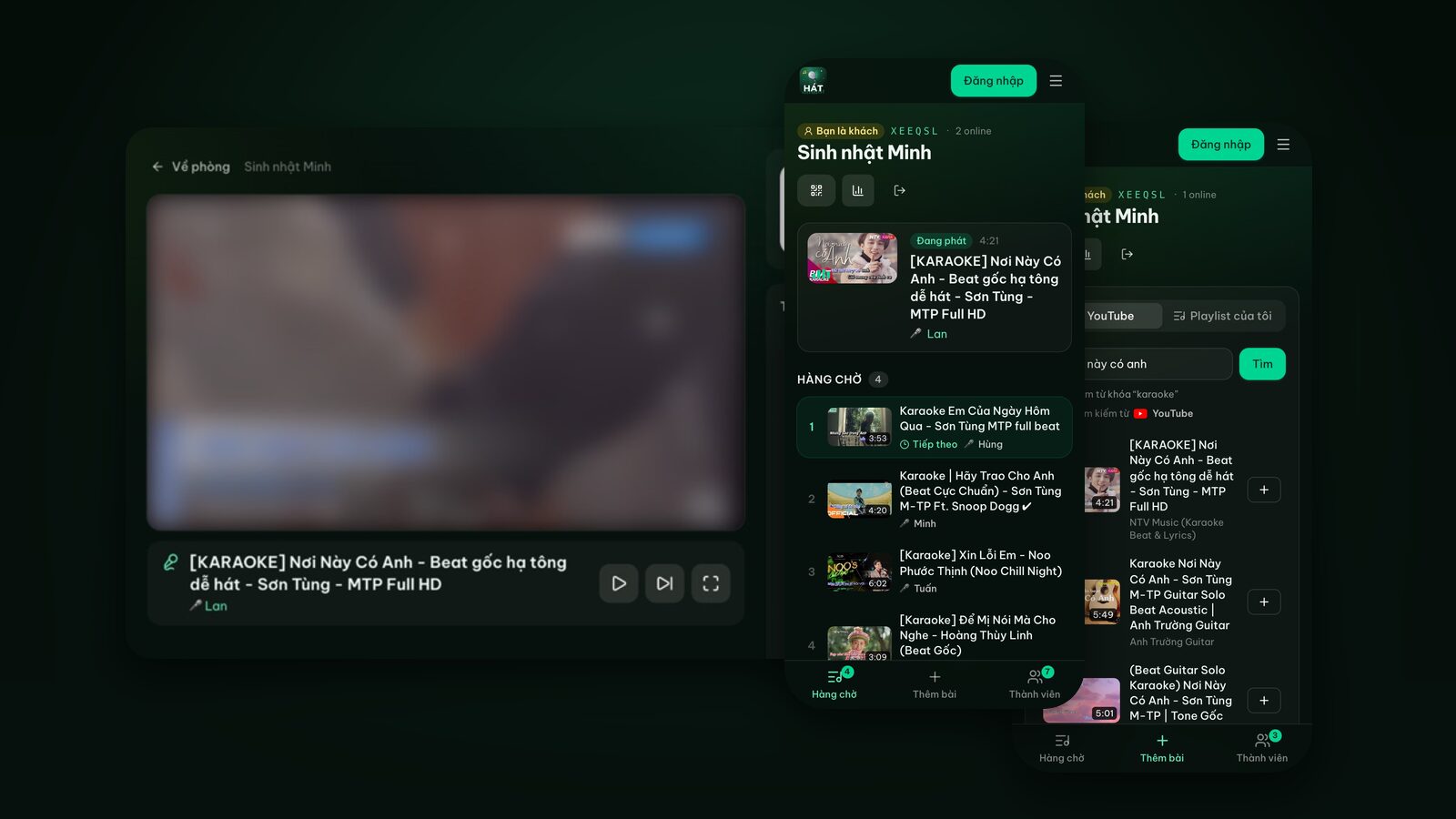
- 1The guest opens their phone camera and scans the QR code.
- 2The room opens in the browser; they type a name and tap Join room.
- 3In the Add songs tab they search and tap + to queue a song.
- 4When it's their turn, the player shows their name, so nobody has to shout "whose song is this?"
Where's the QR code? In two places:
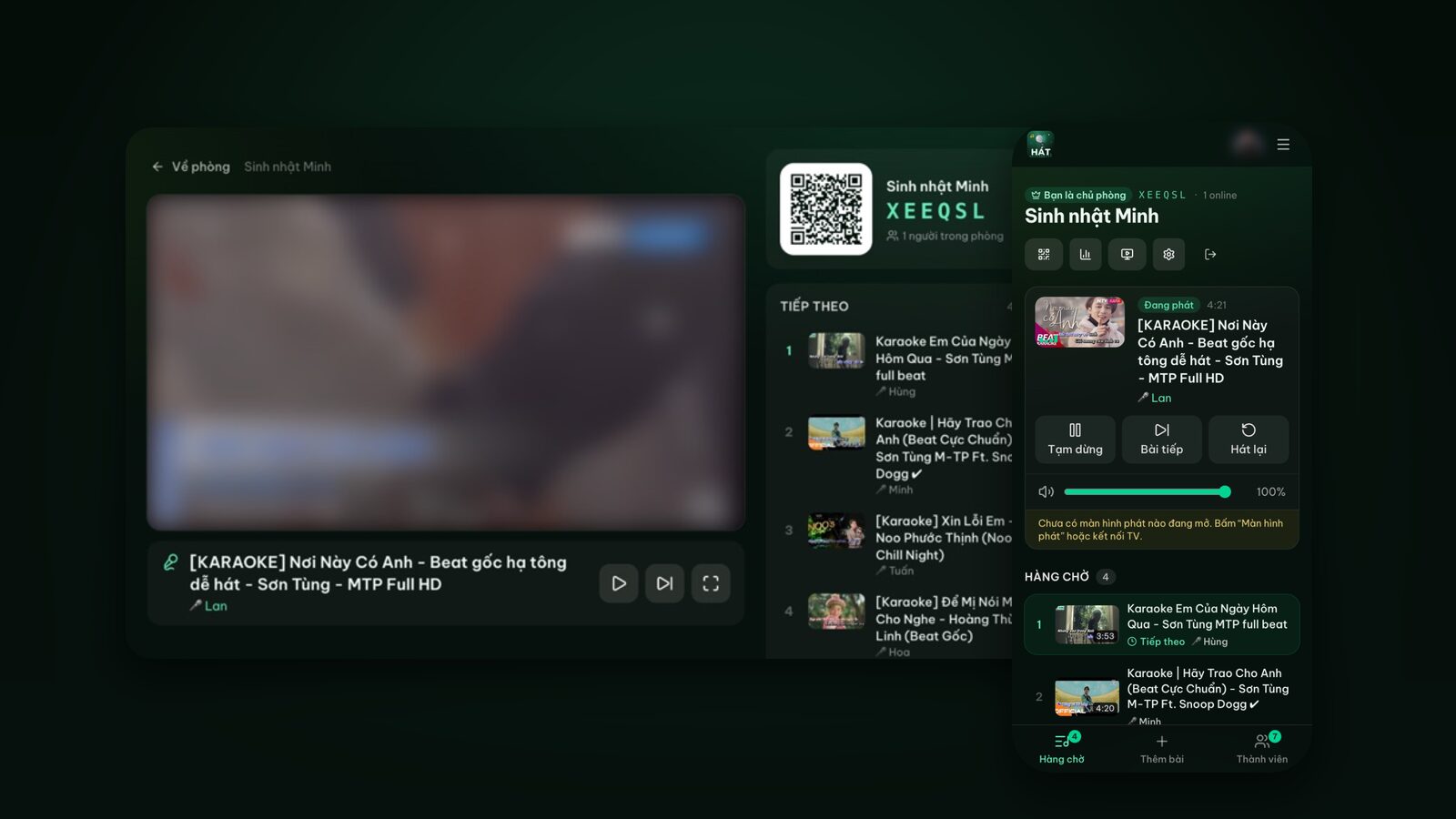
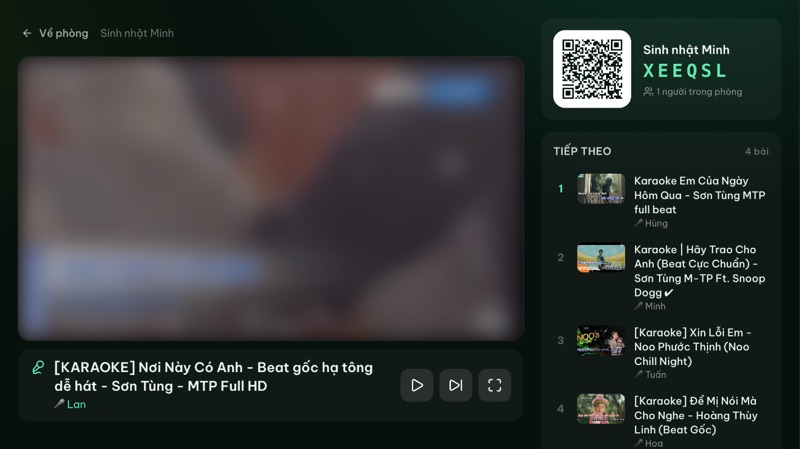
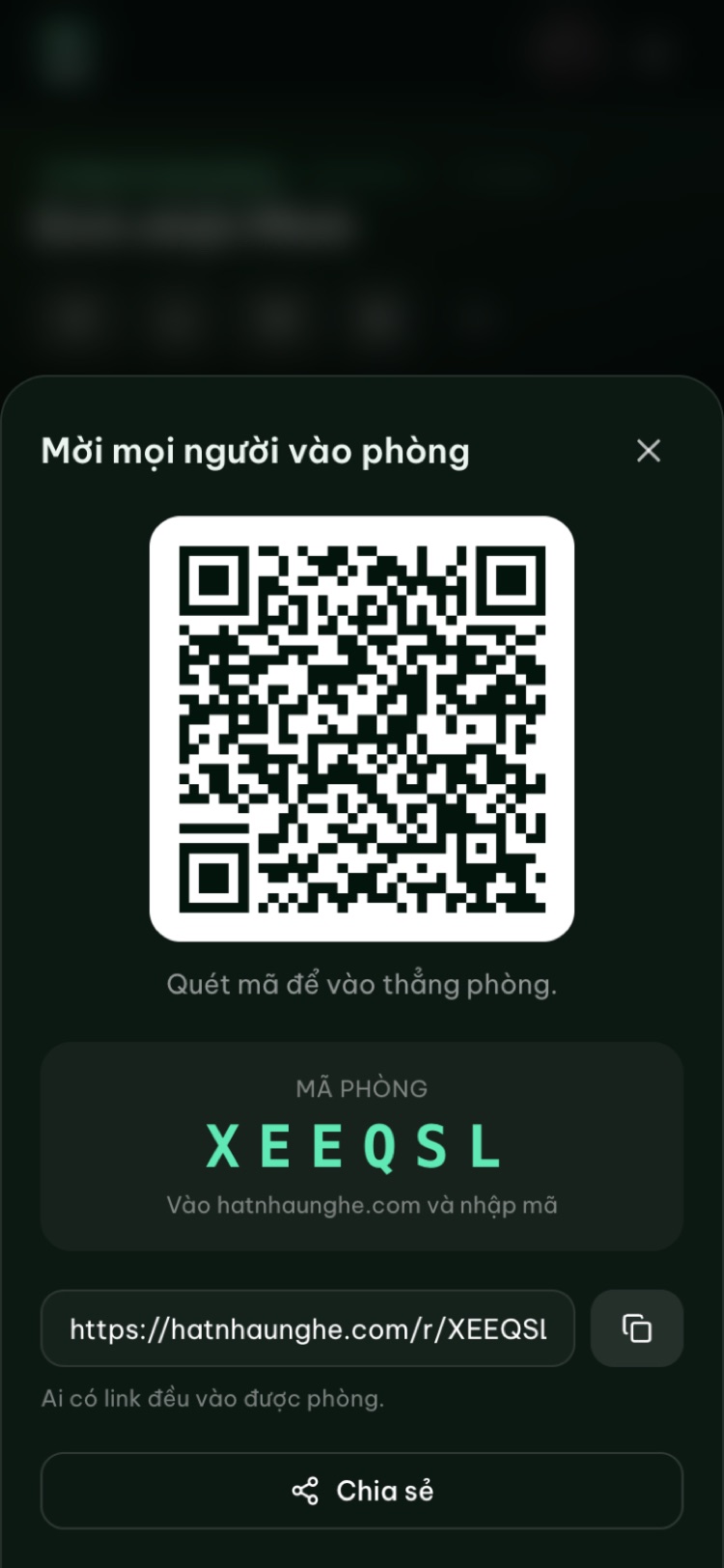
- On the player screen itself. The right side of the player always shows the room QR code, the room name and the 6-character room code. Guests near the screen just point their phone at it.
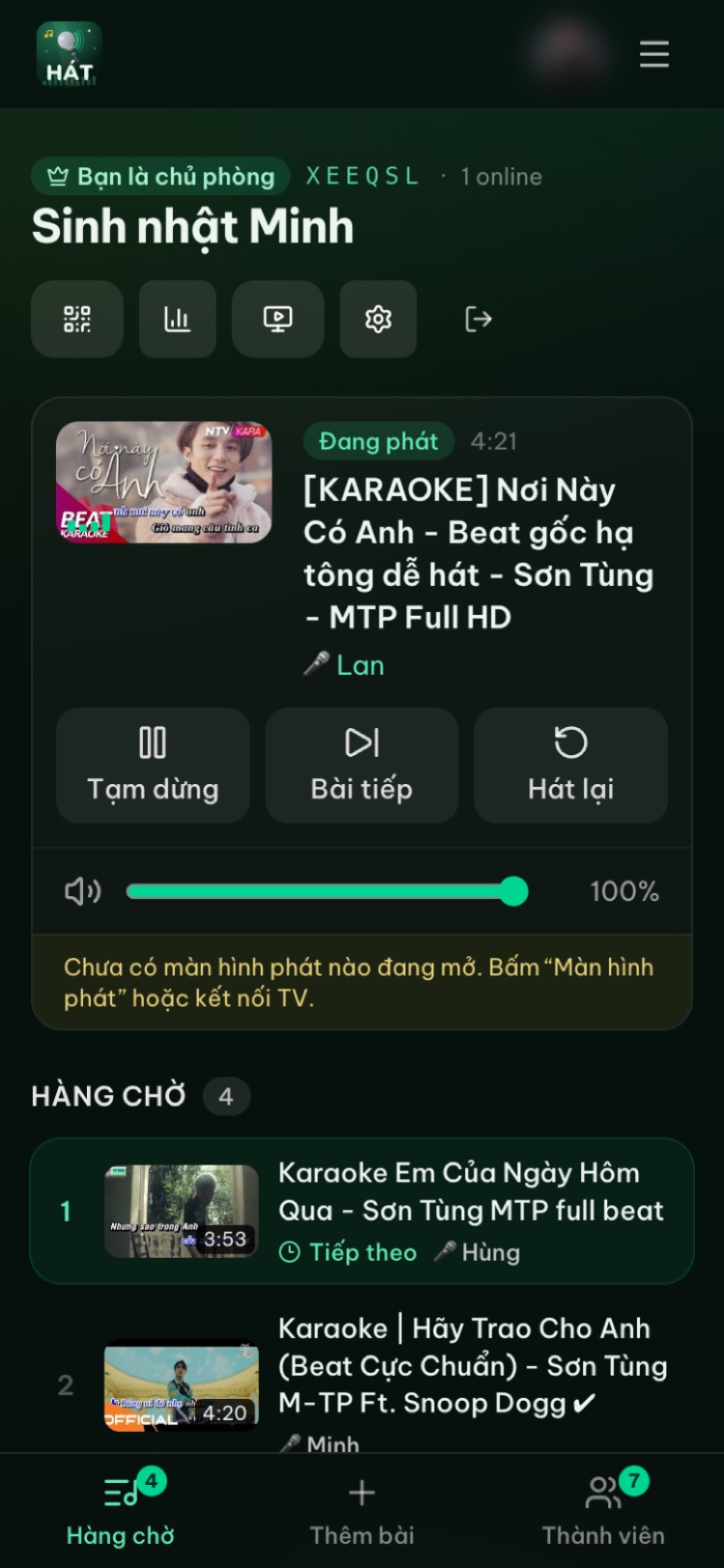
- Behind the Invite button on the host's phone. Tap Invite for the QR code, the room code and the room link. You can screenshot it or print it.
Printing the QR code for the wall or the tables
Plenty of venues like to print the QR code and put it in a stand next to the screen or on each table. It helps tables far from the screen, but know three things first:
- 1The QR code belongs to one specific room. Rooms are deleted after 24 hours of inactivity, and a new room gets a new room code, so yesterday's printout won't lead to tonight's room. In practice, the simplest approach is to open a new room each night and reprint, or rely on the QR code on the player screen.
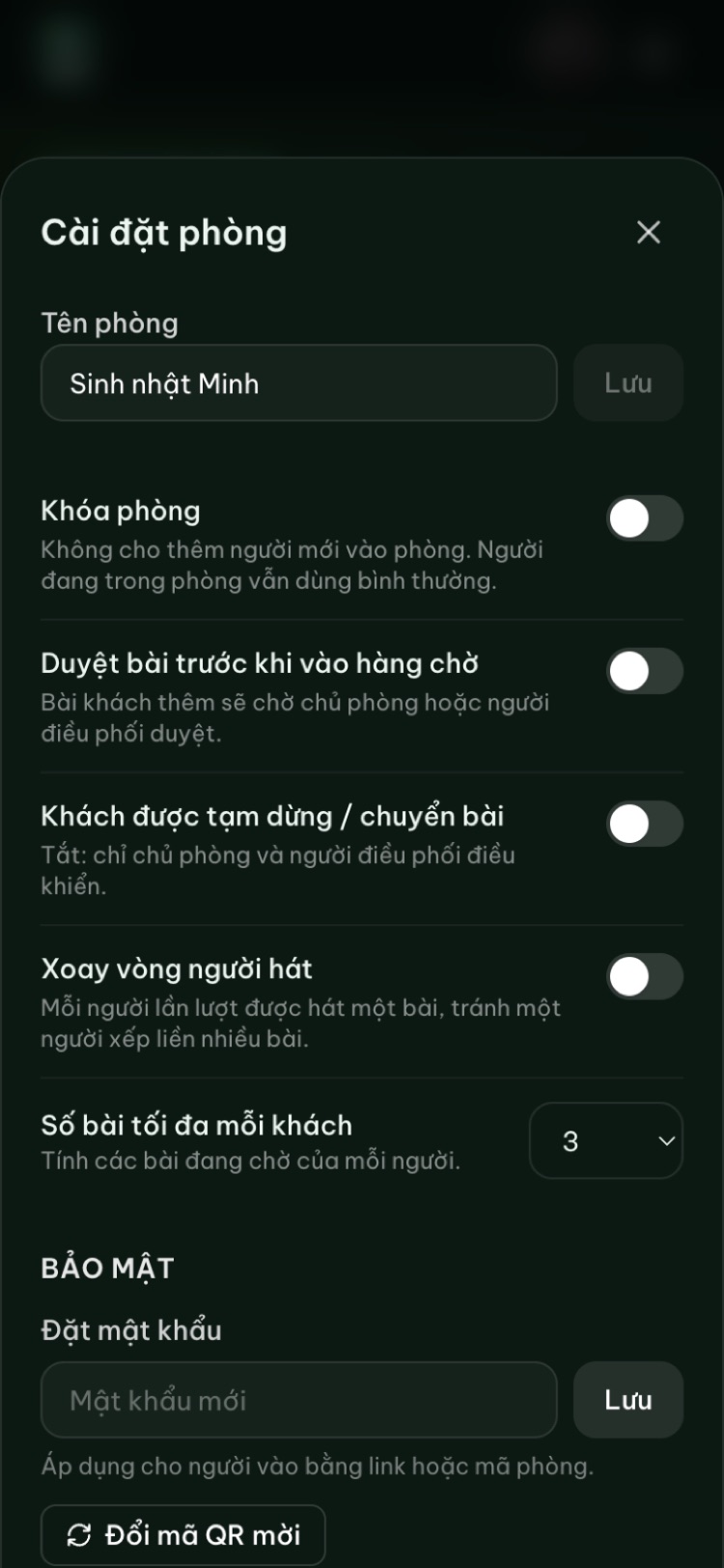
- 2"New invite QR code" in room settings creates a fresh invite code. The QR code on the player and behind the Invite button update automatically; your printout doesn't. The invite QR code lets people skip the room password. After you change it, the old printout loses that shortcut: if the room has a password, people scanning the old code have to enter it. If the room has no password, anyone with the room code can still get in.
- 3Anyone who photographs the code can join, even from home. That's why the room lock and password matter; more on that below.
Try it in your browser
Open a free karaoke room, let friends scan the QR code and start singing in seconds. Nothing to install.
Keeping order: approvals, limits and staff moderators
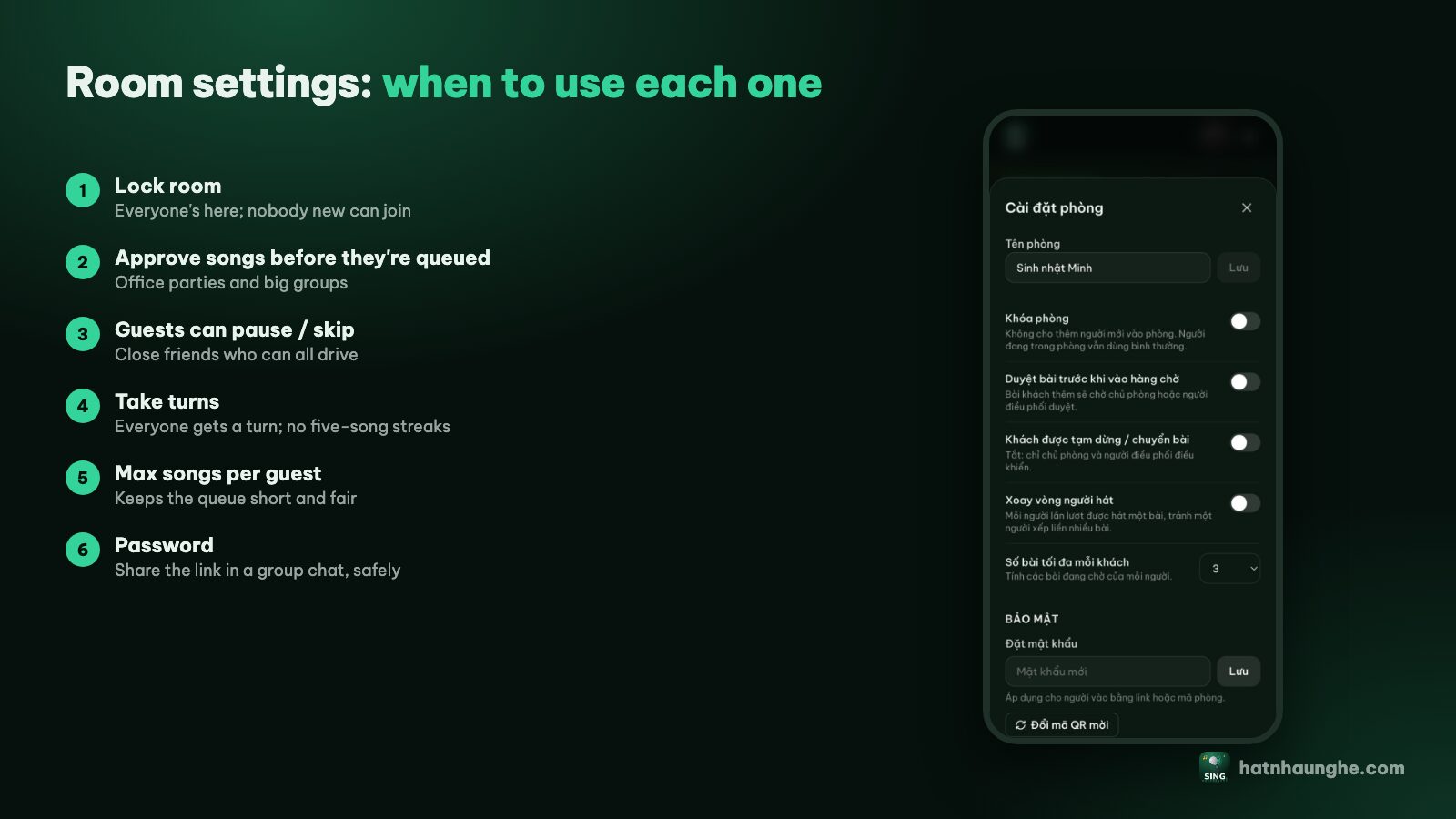
This is the most important part of venue karaoke. Everything lives in Room settings on the host's phone.
Approve songs before they're queued
Turn on Approve songs before they're queued and guests' songs wait until the host or a moderator taps Approve or Reject. For a venue I'd always turn this on: it filters out songs that don't fit the mood, overly long videos, and explicit lyrics when families with kids are at the next table.
Turn off guest pause and skip
Leave Guests can pause and skip off. Then only the host and moderators control playback, and nobody skips another table's song by accident (or on purpose).
Max songs per guest and taking turns
- Max songs per guest counts each person's songs waiting in the queue. Set it to 1 or 2 on busy nights so nobody takes over the queue.
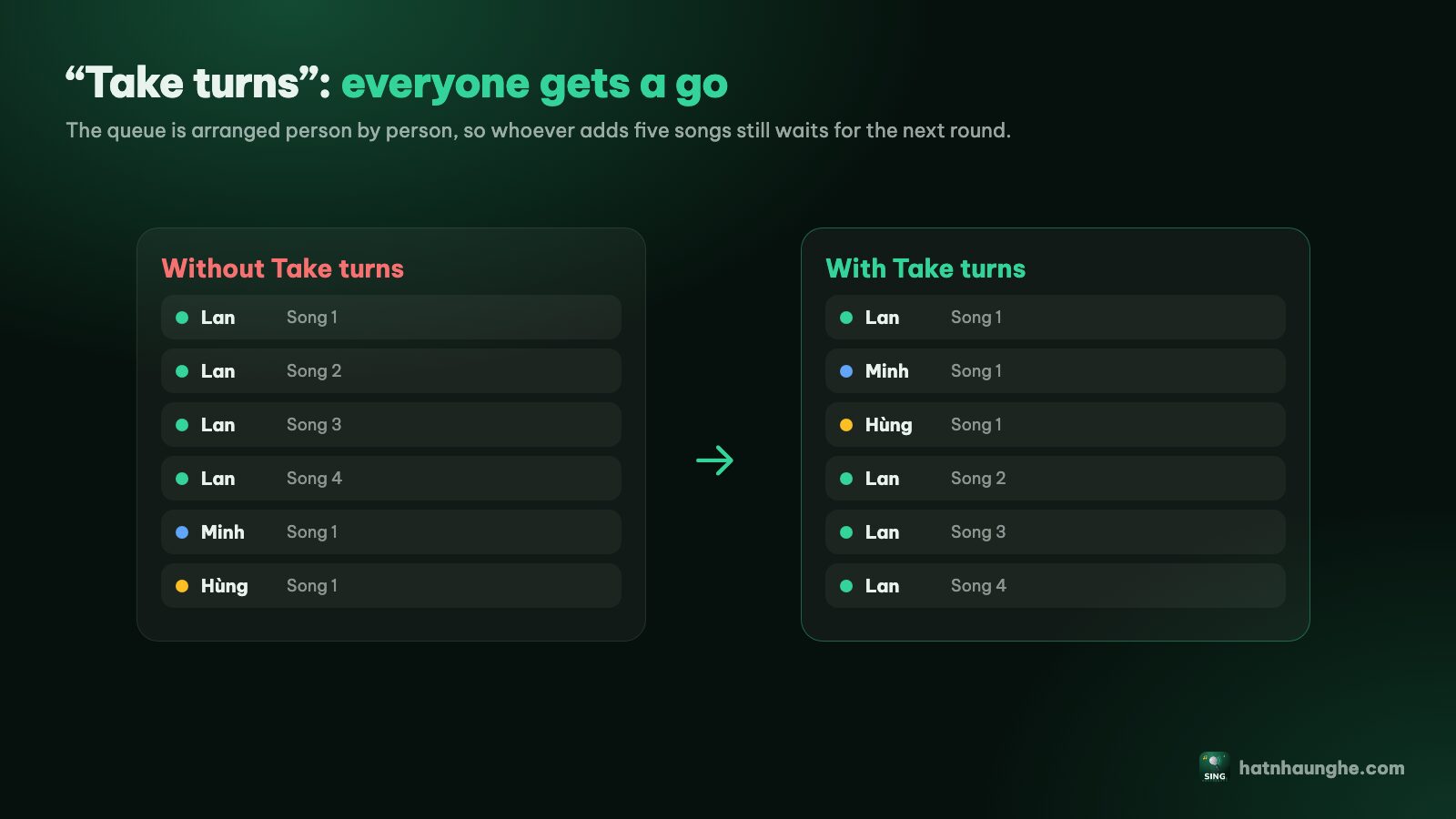
- Take turns orders the queue by person: everyone gets one song in turn, and someone who adds five songs waits for the next round.
For more on fair turns, see running a karaoke room so everyone gets to sing.
Make your staff moderators
The owner can't hold a phone all evening. Staff just scan the QR code like a guest, then the host opens the Members tab and taps Make mod next to their name. Moderators can approve, reorder and skip songs and pause playback. At the end of a shift, tap Revoke.
Lock the room and set a password
- Lock room: no new people can join; everyone already in carries on. Useful when you're full or close to closing time.
- Set a password: applies to people joining with the link or room code. People scanning the invite QR code still get straight in.
- Remove someone: in the Members tab you can remove a person, and they can't rejoin that room.
If a stranger causes trouble (usually someone who photographed the code and joined from elsewhere): lock the room or set a password, then tap New invite QR code. Swap the printed code on the tables if you use one.
Groups bigger than 10 need Premium
On the free plan a room holds up to 10 people, host included. The count is people who have joined the room, not just those online right now. A guest who taps Leave room frees their spot; a guest who just closes the browser still counts.
With guests coming and going all evening, 10 spots go quickly. If the host has Hát nhau nghe Premium, rooms have no member limit. Premium is bought in the mobile app (yearly or lifetime) and works on the web once you sign in with the same account. It also unlocks a score after each song and Play next for the host and moderators. The score is an automatic fun score, not based on anyone's voice, so present it to guests as a game. More in karaoke scoring and star ratings.
Guests always join your room for free; they never need to buy anything.
Volume, hours and neighbors
Karaoke is fun, but it's also a classic source of complaints, especially in residential areas. A few rules that work:
- 1Set clear karaoke hours. Put them on a sign or on the printed QR code, for example "Karaoke 7 to 9:30 pm". Check your local noise rules and pick a time a little before the cutoff.
- 2Adjust volume from the phone. The host's room page has a Player volume slider that changes the TV volume instantly. Mic volume is still set on the speaker, since the site doesn't capture or process mic audio.
- 3Point speakers inward. Toward the guests, not toward the street or the neighbors.
- 4Turn the bass down late. Low frequencies travel through walls further than voices.
- 5Lock the room about 30 minutes before you stop. No new guests join, and people in the room finish the songs already queued.
For speakers and mics in a space bigger than a living room, choosing speakers and mics for karaoke has some general advice.
Wrapping up the night
Before closing the room, open Night recap to see how many songs were sung, for how long and who sang the most. You might share a screenshot on the venue's page (ask guests first if their names are on it). To reuse the song list, save the whole night as a playlist.
Then go to room settings and tap Close room. The queue, history and member list are deleted immediately and can't be restored. If you don't close it, the room deletes itself after 24 hours of inactivity.
Licensing and terms: read this part carefully
I want to be very clear here, because this is about your legal responsibility as the business, not your guests'.
- Playing music publicly in a business may require a license. In many countries, playing music for customers in a café, restaurant or guesthouse counts as a public performance or public use of the works. In Vietnam, organizations such as the Vietnam Center for Music Copyright Protection (VCPMC) collect royalties for public use of music; other countries have their own collecting societies. Whether you need to pay, and how much, depends on your type and size of business.
- Videos come from YouTube and YouTube's terms apply. Hát nhau nghe plays videos only through YouTube's official embedded player; it doesn't download, store or block ads. YouTube's Terms of Service govern how these videos are watched and played, ads included.
- Hát nhau nghe is not a licensed commercial karaoke system. The site holds no public performance license on your behalf. Its own terms say the service is for personal, non-commercial entertainment, and that if you use it in a bar, at an event or for any business purpose, you're responsible for any public performance licenses required by law. See the Terms.
I'm not a lawyer and this isn't legal advice. The practical advice: before running regular karaoke nights for customers, contact your local music rights organization or licensing authority, or ask a qualified professional, to find out exactly what applies to your venue. A private sing-along with friends after closing is a different situation, but that's a line you should check for yourself.
Quick checklist for a venue karaoke night
- Test the player screen, speakers and mics in the afternoon; press OK on the TV remote once.
- Open a new room for tonight with an easy name like "Friday karaoke".
- Turn on song approval, turn off guest skipping, set max songs per guest, turn on Take turns.
- Have staff join and make them moderators.
- Print a fresh QR code (if you use one) with the karaoke hours on it.
- Set a password if you'll post the room link in a group chat or on your page.
- Lock the room before closing time, check the recap, then close the room.
Try it in your browser
Open a free karaoke room, let friends scan the QR code and start singing in seconds. Nothing to install.
FAQ
Do guests need to install an app or create an account?
No. Guests scan the QR code with their phone camera, type a name and they're in. Only the host signs in with Google to open a room. The phone apps are optional; see the Hát nhau nghe apps for phone and TV.
Can I print one QR code and use it forever?
Don't count on it. The code belongs to one room, rooms are deleted after 24 hours of inactivity, and a new room has a new code. Making a new invite QR code also stops an old printout from skipping the password. Reprinting each night, or using the code on the player screen, is the safe bet.
How many guests does the free plan allow?
Up to 10 people per room, host included. If the host has Premium, there's no limit.
Can staff run the room instead of the owner?
Yes. Have them join the room, then tap Make mod in the Members tab. Moderators can approve, reorder and skip songs.
Does Hát nhau nghe cover music licensing for my venue?
No. It's a free tool for personal entertainment and comes with no license of any kind. Getting permission to play music publicly and following YouTube's terms is the business owner's responsibility.
What if the internet drops?
Songs play from YouTube, so the player screen needs internet. If the connection to the server drops, adding songs pauses but the player keeps going through the songs already queued. Use a stable connection for the player screen and, if you can, a separate guest network.
Need help? Write to support@hatnhaunghe.com or join the "Nghiện Hát" Facebook group. Have a great night.